Put a post-it on your monitor for something you want to practice
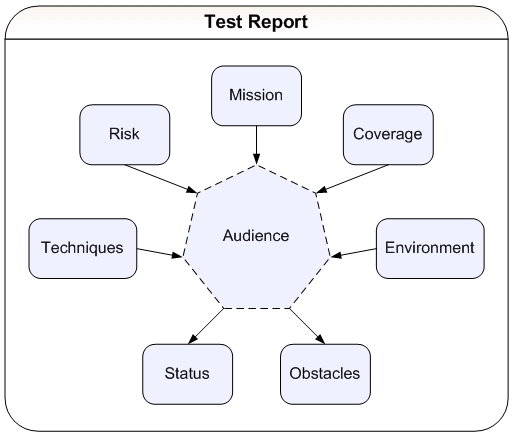
When I was learning MCOASTER, I put this graphic on a post-in and put it on the bottom of my monitor. I then asked people to randomly quiz me on my test status throughout the day. People would walk up and say, "Hey Mike, can you give me a quick update on what you're testing?" I'd look at the post-it and quickly walk through each of the elements as I outlined my testing.

You can do this with any testing heuristic, technique, or idea you want to learn better. Find a way to sumarize it, write it down, and then ask people to help you use it. If you only put the post-it note there, you'll eventually stop seeing the post-it note. It will just blend it. You also need people willing to help you practice.
Keep notepad handy to clear formatting
As a tester, I suspect you do a lot of copy and paste. Sometimes it's test data from a file into an application. Sometimes it's from a screen into a defect report. And sometimes it's from one application into another. Many times, it can be nice to remove formatting before you paste.

I keep Notepad (or TextEdit on my Mac) open all the time so I can quickly paste and re-copy to/from Notepad before I paste it into the target application. This automatically removes all simple formatting (bold, italics, fonts, etc...) and makes it much easier to clean up spacing formatting (tabs, spaces, etc...).
Try smaller lunch and learn topics
Most people are familiar with the concept of lunch and learns. They are also sometimes referred to as brown-bag sessions. It's where a group gets together over lunch and someone presents a topic to the group. I like lunch and learns a lot, they are a cheap way to get people thinking and talking about testing concepts.

Another alternative to having one person present for the entire period is to have everyone bring something small to the table. Give each person five to fifteen minutes (depending on the size of your team) where they present a test tool, project artifact, test technique, software development idea, or new application functionality.

This is a good way to shake things up. Sometimes it's difficult to get someone to want to present on a topic for an entire lunch session. Here the commitment is much lower.
Graphviz
Recommended by Rick Grey, if you liked WebSequenceDiagrams.com, try Graphviz. From the website: "The Graphviz layout programs take descriptions of graphs in a simple text language, and make diagrams in several useful formats such as images and SVG for web pages, Postscript for inclusion in PDF or other documents; or display in an interactive graph browser."
Heuristics for effective modeling
When I'm testing, I do a lot of explicit modeling. I say explicit, because I actually draw pictures. They aren't just in my head. I have a couple of heuristics I use to know when I'm done modeling a testing problem:

  1. If I can't derive explicit test cases from my model, perhaps it's not detailed enough and I need to keep working on it.

  2. If I can't explain it quickly to another tester, perhaps it's too detailed and I need to abstract it a bit more to simplify it.